Product Listing Overview – Mobile
Atomic Design
Level: Organism · Atomic Design methodology
The mobile variant displays the Product Listing Overview in a vertical stacked layout where filters are hidden inside a slide-out drawer overlay, optimized for screens under 1024px width.
The Mobile Product Listing Overview variant handles the category browsing and searching experience for touch-focused mobile and tablet devices. Due to restricted screen width, it hides the complex filter menu behind a floating trigger button. Clicking the trigger opens a full-screen slide-over drawer containing the accordions.
For the general composition and the default desktop variant, see the Product Listing Overview index.
Composition
Used inside: Category Page Template · Search Results Page Template
Composed of: Product Card Molecule · Filter Block (Refinement List · Rangeslider · Size selection · Color selection · Clearrefinement inside slide-out drawer) · Toolbar Block (Sortby · Pagination)
Preview
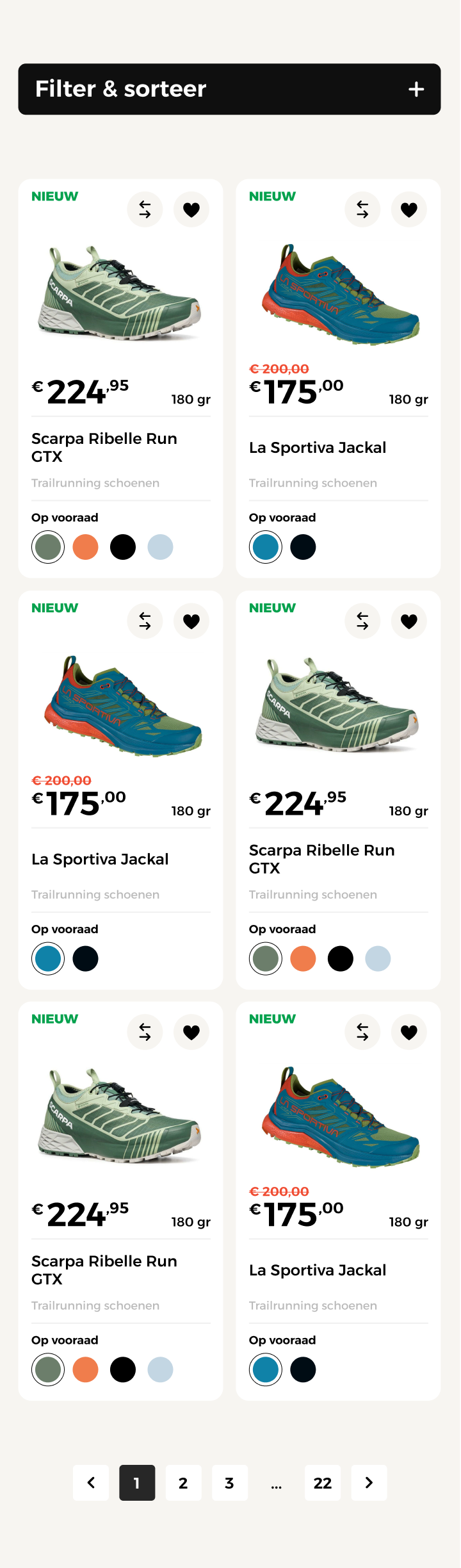
The mobile view of the PLP layout showing the vertical scroll layout and the filter drawer trigger button.
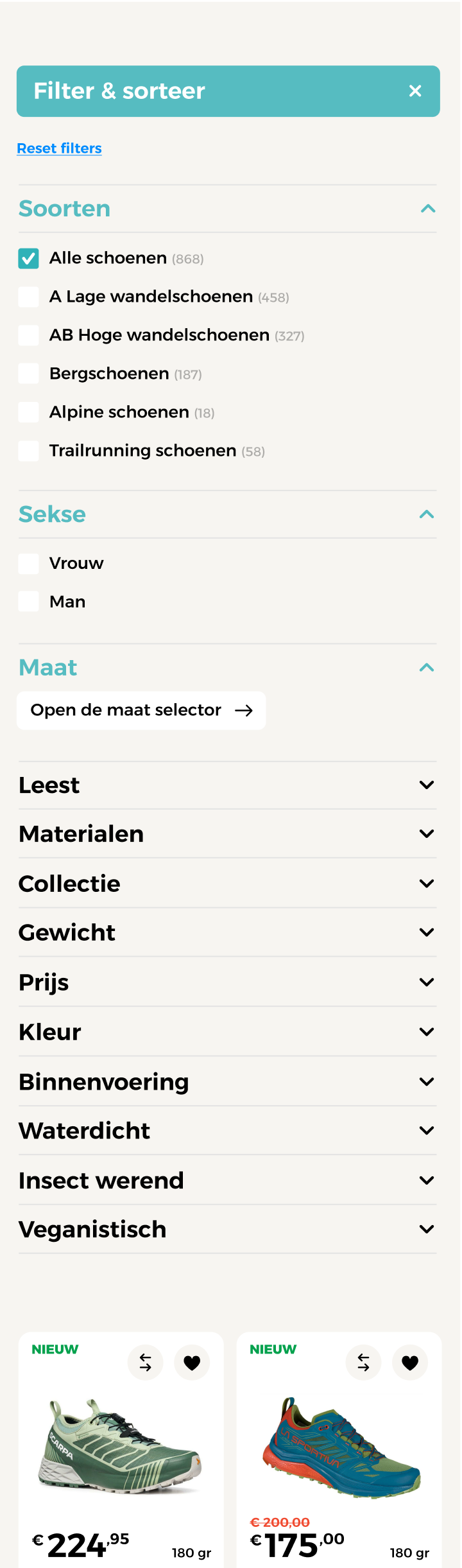
Close-up of the mobile slide-out filter drawer overlay containing refinement options and the results confirmation button.
Props
Top-level props (Mobile Overrides)
| Prop | Type | Required | Description |
|---|---|---|---|
products |
Product[] |
Yes | Array of product data records matching active filters to populate the grid (usually rendered in a 2-column flex layout) |
filters |
FilterGroup[] |
Yes | List of available filter groups for rendering inside the slide-out drawer |
activeFilters |
Record<string, string[]> |
Yes | Key-value mapping of active filter groups and selected options |
isFilterDrawerOpen |
boolean |
Yes | Controls the visibility of the slide-over filter drawer |
activeFiltersCount |
number |
Yes | Total count of all selected checkbox values (drives the floating badge count) |
hitsPerPage |
number |
Yes | Number of products displayed per page (inherited from parent Toolbar config) |
pagination |
PaginationData |
Yes | Pagination state details |
Visual States
| State | Condition | Visual effect |
|---|---|---|
| Filter Drawer Open | isFilterDrawerOpen: true |
The filter drawer slides in from the right edge. A dark semi-transparent overlay (50% opacity backdrop) covers the background grid. |
| Sticky Action Bar | Scrolling down the product grid | A floating toolbar containing the "Filter" trigger and the active filter badge sticks to the bottom or top of the viewport. |
| Scroll Lock Active | isFilterDrawerOpen: true |
The body element gets overflow: hidden applied to prevent background page scrolling while interacting with the filter drawer. |
| Grid Column Adapt | Screen width < 480px | The product grid columns automatically switch from 2 columns to a single vertical card stack. |
Behaviour
Slide Drawer Interactivity
The filter drawer is built with native touch gestures in mind. Swiping right from the left edge of the drawer panel triggers a close transition, sliding the menu back off the screen.
Instantly Applied vs. Batched Filters
Unlike the desktop default view which applies filters instantly on checkbox click, the mobile drawer batches filter selections. Checking boxes updates the internal state and shows a count, but the API request is only triggered when the user clicks the "Bekijk resultaten" (View results) confirmation button at the bottom of the drawer.
Sticky Drawer Headers
To maintain clear navigation within long filter lists, the drawer header (containing the "Close" and "Reset filters" buttons) remains sticky at the top, and the confirmation button remains sticky at the bottom, while the middle accordions scroll vertically.
Example
Full example JSON
{
  "products": [
    {
      "id": "scarpa-ribelle-run-gtx",
      "name": "Scarpa Ribelle Run GTX",
      "category": "Trailrunning schoenen",
      "inWishlist": true,
      "inCompare": false,
      "price": {
        "currency": "EUR",
        "symbol": "€",
        "regular": 249.95,
        "sale": 224.95
      },
      "spec": {
        "type": "weight",
        "value": 180,
        "unit": "gr",
        "icon": null
      },
      "stock": {
        "available": true,
        "label": "Op voorraad"
      },
      "variants": [
        {
          "id": "forest-green",
          "color": "#4A7C59",
          "label": "Forest Green",
          "active": true,
          "images": [
            {
              "src": "/images/scarpa-ribelle-run-gtx-forest-green-1.jpg",
              "alt": "Scarpa Ribelle Run GTX – Forest Green"
            }
          ]
        }
      ]
    }
  ],
  "filters": [
    {
      "id": "soorten",
      "name": "Soorten",
      "type": "list",
      "collapsed": false,
      "options": [
        { "value": "lage-wandelschoenen", "label": "Lage wandelschoenen", "count": 458 },
        { "value": "trailrunning-schoenen", "label": "Trailrunning schoenen", "count": 58 }
      ]
    }
  ],
  "activeFilters": {
    "soorten": ["trailrunning-schoenen"]
  },
  "activeFiltersCount": 1,
  "isFilterDrawerOpen": true,
  "hitsPerPage": 24,
  "pagination": {
    "currentPage": 1,
    "totalPages": 3,
    "totalItems": 58,
    "itemsPerPage": 24
  }
}